Tue, Dec 04, 2012 | 21:57 GMT

Dishonored title update 1.2 fixes bugs, supports multiple screen play
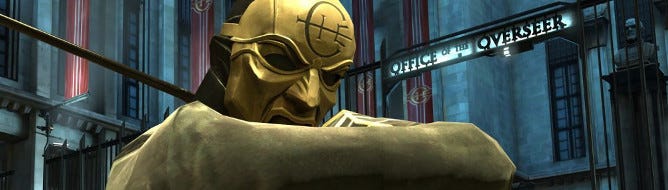
Arkane has released a title update for Dishonored which fixes various bugs and supports playing the game on multiple screens.

Update 1.2 is available for all formats, and contains the following fixes:

  • Support for playing the game on multiple screens.
  • Game Settings are now saved and restored properly even when using Steam offline.
  • Fixes for some interactions with Granny Rags that invalidated nonlethal playthroughs under certain circumstances. (Note: These fixes work even for savegames AFTER the final Granny Rags encounter.)
  • Fix for a crash that could happen during loading/transition between areas – notably near Dr. Galvani’s house.
  • Reworked “Choke” interaction to make it more reliable in valid contexts.
  • Fixed minor localization issues (PS3/360).
  • Fixed global post-process that sometimes worked improperly during some missions.
  • Fix for a rare crash that could happen when killing a NPC with a possessed rat and spring razor (PS3/360)

Load your game up on PC, PS3, or Xbox 360 and apply the patch now.

13 comments

#1

Mike W
05/12/12, 1:13 am

Hey Steph I don’t know if you got a chance to get this game and this is just my opinion, but this is the shittest looking game I ever seen. :(

Even on the PC…

#2

Telepathic.Geometry
05/12/12, 2:02 am

Seriously? I play it on the PS3, but I think it looks fucking amazing, the art style is beautiful…

#3

Sini
05/12/12, 2:18 am

It looks pretty bad on ps3, in comparison pc is much better, especially if you use color injectors and such.

#4

Telepathic.Geometry
05/12/12, 2:32 am

Well, I guess I come at these things from an artistic point of view. This game is very pretty in the sense of art direction and style, in the same way as I feel like Okami is and Rez is and Bioshock is. Maybe the technical end of things doesn’t hold up, but they jazz my motor-neurons so…

#5

Sini
05/12/12, 3:23 am

I’m talking about removing jaggies and getting rid of bleached color palette, you still retain the la di da artsy crap.
One such example
http://www.dsogaming.com/news/dishonored-can-look-gorgeous-vanilla-vs-modded-comparison/

#6

Phoenixblight
05/12/12, 4:00 am

@5

Thats too much color imo especially for how the game is supposed to be about a bleak and desperate time. The amount of color is what you expect from a ratchet and clank game not a game that is telling a story about people being oppressed and fighting the system.

#7

Telepathic.Geometry
05/12/12, 5:27 am

Well, sounds like it’s a tech debate so, in which case, I don’t know shit! ^-^ (o/

#8

Samoan Spider
05/12/12, 11:21 am

I would say its a good looking game in an unusual way. Taking it for what it is, I’ve really enjoyed playing it, and even come to enjoy the bleak look (artistically and technically). I can’t help but feel they didn’t tap the potential of the unreal engine here, but it works and can’t be called an ugly game. And just to add, this is a PC players opinion.

#9

fearmonkey
05/12/12, 7:20 pm

Dishonored looks like the fable series with how the characters are drawn. It’s a very pretty game at high res and full options on. You have to give them credit that it certainly doesn’t look like almost every other Unreal engine 3 game.

#10

Cobra951
05/12/12, 8:39 pm

I take it there’s a disconnect here between the PC and console versions? I haven’t had a gaming PC in years. My experience with big games for the past 6 years is console-bound. That experience tells me that Dishonored looks quite good. Is the problem some of you are having that the PC version doesn’t measure up to that more lofty standard?

#11

Maximum Payne
05/12/12, 9:13 pm

@10 I played on PC. Zero problem.
Its great port. It runs very well, have fov slider , pc UI for hotkeys and it doesn’t have washed out colors like in console version IMO.

#12

monji
04/01/13, 7:01 am

Hi all!
Here u are!the ultimate dishonored app crash (long error kernel….)fix with ati card !
1-just right click desktop and click on screen resolution and see your current resolution
2-right click desktop and go to amd vision engine control center(amd ati catalyst software)
3-open ‘my vga displays’ > ‘properties(vga display)’
4-untick ‘Use extended display identification data(edid) or driver defaults’
5-set your resoulution in step1 u see and the refresh rate too 60-200hz(its 75 for me, depend on your monitor)
6- now take a breath and open my lovely game of the year best story best action best… Dishonored with no f***g error! cheers!
sorry for my english!

dont forgot to mail me and say thx if your prob is solve! Ardalan@outlook.com

#13

DrDamn
04/01/13, 8:49 am

Agree with T.G. – just playing through on 360 now. Technically it’s lacking in a few areas, texture quality being the main one, but artistically it’s great. It’s also very cohesive – in that the overall output is very consistent, solid and smooth.

Leave a Reply